
SOCIAL MEDIA MANAGEMENT IN KENYA
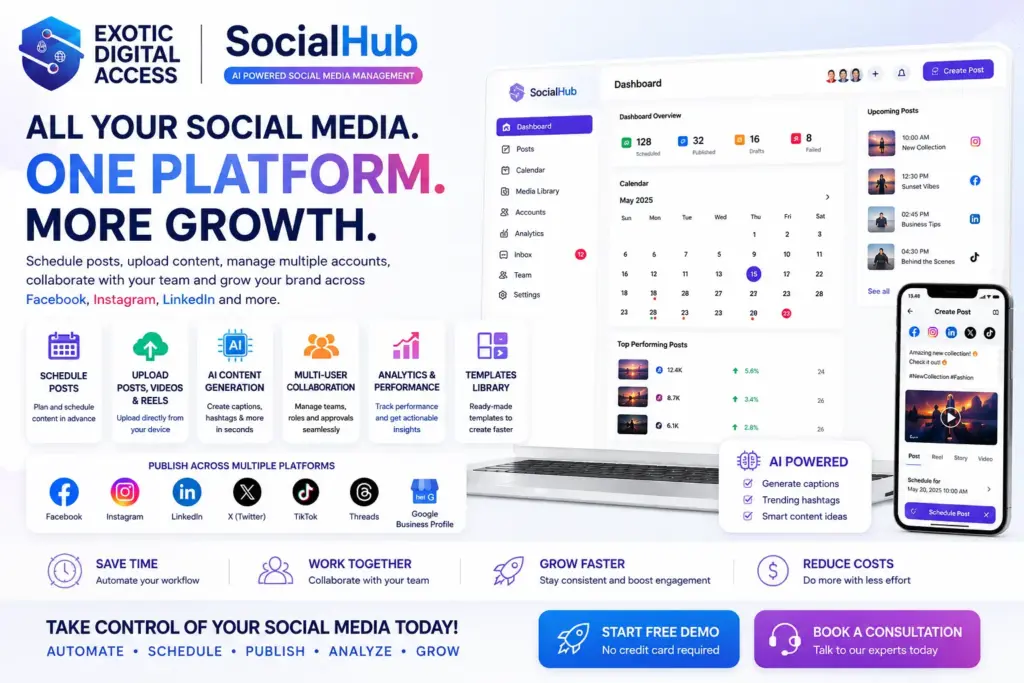
One workspace for your social content
Your next post starts with a clear message. SocialHub by Exotic Digital Access brings content preparation, connected social profiles and scheduling into one workspace, so you can plan what to share and keep track of what goes out.
- Prepare posts for the profiles you manage.
- Build a publishing schedule rather than posting in a rush.
- Choose a plan with the account and content allowances you need.
CORE FEATURES
CONNECTED ACCOUNTS
Multi-Platform Publishing
Keep your social profiles organised without treating every network as if it works the same way. Connect the accounts your plan supports, check the permissions you grant and prepare posts for the right destination.
- Configured plans include combinations of Facebook, Instagram, X / Twitter, LinkedIn, TikTok and YouTube.
- Each provider controls its supported account types, formats and publishing permissions.
- Review the destination and preview your content before you publish.
A STARTING POINT FOR YOUR IDEAS
AI Content Generation
Find a fresh way to introduce your offer, outline a post or work through a caption. AI assistance is a drafting tool—not a substitute for your knowledge of your customers.
- Check the AI allowances and availability for your chosen plan.
- Review facts, tone, spelling and media rights before using generated material.
- Keep passwords and sensitive customer records out of prompts.
PLAN AHEAD
Bulk Scheduling
Bring a batch of posts into your publishing workflow and make space to review them before they go out. Work within the post allowance on your plan and the rules of each connected network.
- Check dates, time zones and the intended social profile.
- Review links, images and captions before scheduling.
- Confirm time-sensitive posts on the destination platform.
WORKING WITH YOUR TEAM
A Clear Publishing Workflow
A shared content plan helps your team know what is ready, what needs review and who is responsible for the next step. Agree your review process before connecting business or client accounts.
- Keep personal sign-in credentials private.
- Only connect profiles you are authorised to manage.
- If you need separate team roles or approval stages, ask us to confirm the right setup before choosing a plan.
CONTENT PREPARATION
Templates Library
Give repeat content a consistent starting point. Check the templates available in your account, adapt the wording to your audience and add the details that make the message yours.
- Template access depends on your plan and the current library.
- Check prices, dates and contact details every time you reuse a draft.
- Review image and brand permissions before sharing.
SEE WHAT IS NEXT
Social Media Calendar
See your planned content together and leave room for the moments that need a timely response. A calendar helps you spot gaps, avoid conflicting messages and prepare your next publishing session.
- Organise upcoming posts around your business priorities.
- Check the account, date and time before scheduling.
- Review your schedule after changing a platform connection.
KEEP YOUR VOICE
AI-Assisted Content Preparation
Use AI to explore an idea, then make it sound like your business. Add the local context, useful detail and judgement that your visitors and customers expect from you.
- Check availability and usage limits before relying on an AI feature.
- Treat generated statements as drafts that need fact-checking.
- Keep a human review step before publication.
FIND YOUR WORKFLOW
Who Is SocialHub For?
Whether you look after one business or several brands, start with the accounts you manage and the volume of content you need to publish.
- Small businesses: plan regular updates without losing track of everyday work.
- Marketing teams: bring content preparation and publishing schedules together.
- Agencies and multi-brand businesses: compare profile limits and discuss client-account requirements before subscribing.
A MORE ORGANISED ROUTINE
Why Choose E.D.A SocialHub?
Put the practical parts of social publishing in one place. Prepare content, organise your connected profiles and build a schedule you can review.
- Start with the channels your customers use.
- Choose allowances that match your real publishing workload.
- Get help from the E.D.A team with product and account questions.
YOUR FIRST STEPS
How SocialHub Works
Start with your publishing needs, then set up the account and connections that fit them.
- Choose: compare the plans, prices and included limits.
- Connect: authorise only the social profiles you are permitted to manage.
- Prepare: draft your text and media, then check accuracy and rights.
- Schedule: select the destination and timing supported by your connection.
- Review: check published posts and the reporting data your platforms provide.
YOUR ACCOUNTS. YOUR CONTENT.
Security & Privacy
Stay in control of the profiles you connect and the content you share.
Protect your sign-in
Use a unique password and keep it private. Check that you are on the correct HTTPS address before signing in, and tell us promptly if you suspect unauthorised access.
Choose your connections
Only connect social profiles you own or are authorised to manage. Review the permissions requested by each platform; you can revoke a connection through that provider.
Review before publishing
Check your audience, destination, media rights and scheduled time. Review AI-assisted drafts for accuracy and never include passwords or private account tokens.
Know how your data is used
Our SocialHub policies explain account information, connected-platform data, cookies and privacy requests. Contact us before uploading sensitive client information if you need specific safeguards confirmed.
Have a security or privacy question?
Tell the E.D.A team what you need to know about your account or planned use. Please do not send passwords or platform tokens.
YOUR QUESTIONS, ANSWERED
Frequently Asked Questions
Which social networks can I connect?
Plans currently list combinations of Facebook, Instagram, X / Twitter, LinkedIn, TikTok and YouTube. Your selected plan, profile type and the permissions each provider allows determine the connection options. Check the plan details before subscribing.
Can I schedule posts in advance?
Scheduling is included in the configured plans. Prepare your content, check the destination and timing, and work within your post allowance. Confirm time-sensitive posts on the destination platform because provider outages or expired permissions can interrupt publishing.
How does bulk scheduling help?
It brings multiple posts into your publishing workflow so you can organise a batch of content together. Review every post and check the supported formats and limits for your connected accounts.
Are AI tools included with every plan?
The plans have different AI allowances, and some list no word or image allowance. Check the current plan details and ask our team to confirm the AI tools you need. Always review generated material before publishing.
Can I use it for clients or a team?
You can compare plans for the number of profiles and posts you manage. Only connect client accounts with permission. If you need individual team roles, client workspaces or approval stages, ask us to confirm the setup before you buy.
Does the Agency plan include unlimited social accounts?
No. The current Agency plan lists up to 50 connected social profiles and 7,500 posts. Any unlimited allowance applies only to the specific feature identified in the plan, not to every part of the service.
Is there a trial?
A Trial Package is listed on the plans page with 2 social profiles and 10 posts. Check its current availability and displayed terms when creating your account; it does not include every paid-plan feature.
Where can I get help or ask about my information?
Use the SocialHub Contact page for product, account and security questions. The Privacy Policy explains how account information and connected-platform data are used and how to make a privacy request. Never send your password or private tokens.
View current plans → Talk to the E.D.A team → Read Privacy Policy →